Lock-screen security plus one-tap system tools for older Android phones
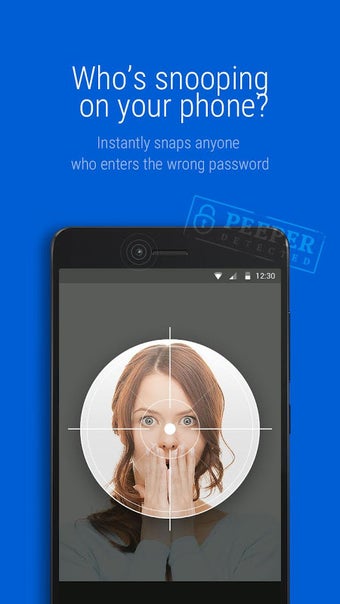
Experience an entry screen that both detects unauthorized access and performs quick maintenance: Intruder Selfie snaps a front-camera photo of failed unlock attempts while Phone Boost clears background RAM from the lock screen. CM Locker (Secure & Boost), from Cheetah Mobile, combines lock customization, notification previews, app-level locking and music controls into a single Android utility. It fits users with older devices who want more lock-screen capabilities and basic performance tools without unlocking the phone.
What does CM Locker do for device security and convenience?
CM Locker replaces the system lock screen and provides a package of security and quick-access utilities. Key functions include an Intruder Selfie that captures faces after repeated incorrect PINs, an AppLock module to protect specific applications, notification previews with optional private mode, music playback controls, and a toolbox with toggles for flashlight, Wi-Fi, and brightness. The app also supplies downloadable lock-screen themes and local weather display.
Does it affect system performance during normal use?
The app offers a one-tap Phone Boost that terminates background processes and frees RAM from the lock screen, designed to target devices with limited resources. Because the Phone Boost runs from the lock interface, it can be triggered without unlocking; the source notes this as a method to improve perceived responsiveness on older hardware. The app’s toolbox approach keeps these utilities available without opening the full app.
Is CM Locker safe to use on a daily device?
Security is mixed: the Intruder Selfie and AppLock operate on-device, and fingerprint unlocking is supported where hardware exists, which preserves biometric convenience. However, the developer’s apps were removed from the official store for disruptive ad policy violations, and the program is currently distributed via third-party APK sources, which raises installation and update trust considerations beyond the app’s built-in protections.
Do casual users need technical knowledge to operate it?
The interface groups actions into clearly labeled lock-screen widgets and a theme library, so basic operations such as enabling notification previews, activating AppLock, or using Phone Boost work with minimal setup. Advanced options, like configuring remote anti-theft via social integration or creating DIY lock screens, require more steps. The app targets users who want immediate on-screen tools without deep system configuration.
Who should install CM Locker and what to watch for
CM Locker suits Android owners seeking a feature-rich lock screen that combines quick security checks and on-screen maintenance. Users who need a single interface for notifications, app protection, and occasional RAM cleanup gain practical value. The principal caveat is distribution: obtaining the app from third-party repositories introduces update and trust risks that technical users should evaluate before installing.